
U-M Canvas Maizey Integration: Now Right Inside Your Canvas Course
The U-M Canvas Maizey Integration just got even better. With the latest update, students can now access the Maizey AI tutor directly inside your Canvas course. This update means no extra tabs, no switching between windows, and no interruptions to their workflow.
What's New
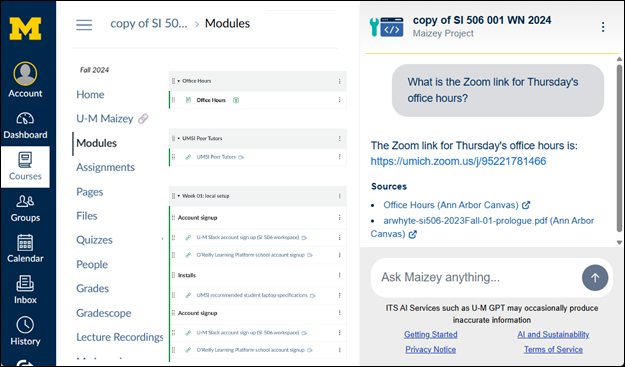
Previously, using Maizey in Canvas meant the Maizey AI tutor would open a separate link outside of the Canvas course. Now, the Maizey AI tutor lives right in the Canvas interface.
When students open the Maizey AI tutor in your course for the first time, they will log in, provide a quick authorization to connect it to their Canvas account, and the Maizey Chat Window opens in a sidebar alongside the course content. After that, the Canvas course AI tutor is available inside the course with just one click.
Benefits of This Update
- Seamless Experience: Students stay inside your course for answers, explanations, and personalized support from their AI tutor.
- No Disruptions: Students keep their focus on your course with everything in one place and no extra browser tabs open.
- Quick Access to Tool Options: Students can easily clear conversations, pop Maizey into a new tab, or log out of Maizey all from the menu inside the chat window.
With Maizey now integrated directly into Canvas courses, learning is smoother, faster, and more connected than ever!