
Google has announced two changes to how restricted sharing permissions are handled in Google Drive. These updates, which build upon the new "limited access" folder feature from earlier this year, are designed to simplify permission management within shared folders.
What’s changing?
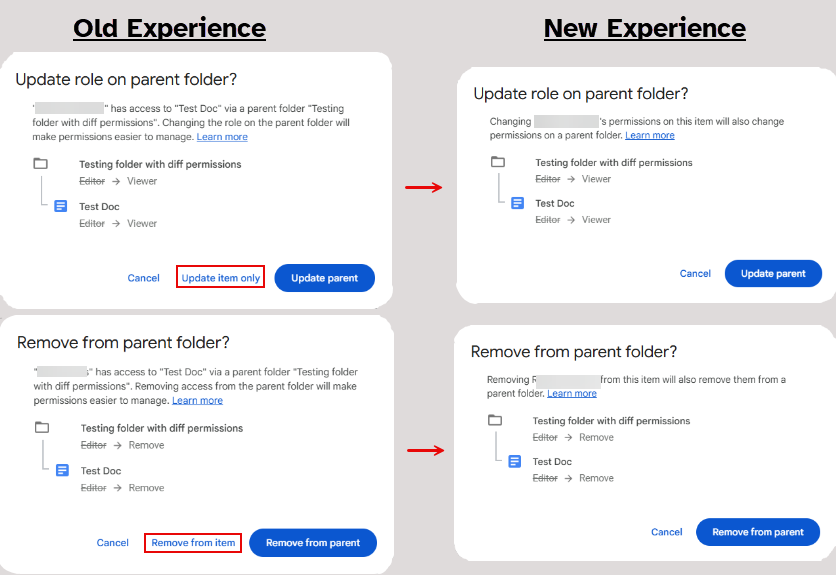
- Individuals with permission to restrict access on a parent shared folder will no longer see the “Update item only”/ “Remove from item” options.
- These options would previously appear when:
- You changed a collaborator's role on a file to something different than what their role is on the parent folder, such as changing it from Editor to Viewer (“Update item only” option).
- You unshared/removed access to a file from someone who is shared on the parent folder (“Remove from item” option).
- These options would previously appear when:
- Moving forward, an individual’s permissions on the parent shared folder will always cascade down to every file and folder within it. The only situation in which this wouldn’t occur is if you create a limited access folder and restrict their access to the files within it.
- Pre-existing files that you updated before this change won’t update their permissions to match the parent, even if you move them within the shared folder.
- Google has stated that they will apply limited access permissions to pre-existing files in 2026. We will provide additional communications closer to when that change occurs and as we know more from Google.
- Files with the “Allow editors to change permissions and share” setting turned OFF will be updated.
- As of September 22, when a file has this setting turned off and the owner moves it into a shared folder, any changes made to the parent shared folder’s permissions afterward will also be applied to the file. (Previously, those changes were only applied if the file owner was the one making the folder permission change.)
- This ensures that the folder's permissions control the access for everything it contains, even when this setting is turned off at the file level.
- Beginning October 8, Google will automatically apply limited access to individual files that have this setting turned off. The file owner will still be the only person who can share these files. Limited access will not be applied to files that turn the setting off after October 8.
- Note: You can’t apply limited access to an individual file yourself. Only Google can do this as part of system-wide permission upgrades like this one. If you’d like to apply limited access to an individual file after October 8, follow Google’s guidance on moving it to a limited access folder.
- According to Google, when they automatically apply limited access to an individual file within a shared folder, it remains hidden from people with access to that shared folder. The automatic change doesn’t change who can access the file.
- As of September 22, when a file has this setting turned off and the owner moves it into a shared folder, any changes made to the parent shared folder’s permissions afterward will also be applied to the file. (Previously, those changes were only applied if the file owner was the one making the folder permission change.)
Refer to the Google Help Center to learn more about limiting access to folders in My Drive and shared drives. Refer to Best Practices for Sharing in Google Drive for other tips on sharing at U-M.